
MCP Explained for Business Teams: Why Your AI Tools Are About to Talk to Each Other

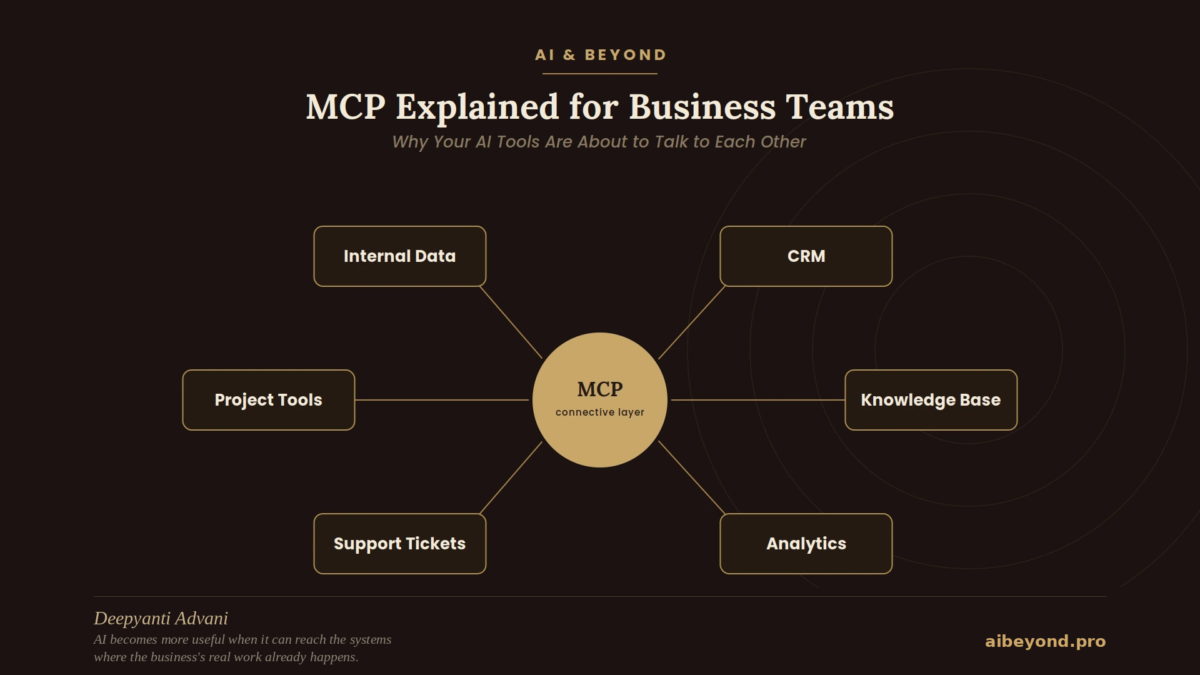
What the Model Context Protocol changes for AI workflows, integrations, agents, and the way businesses connect their tools.
Most companies didn’t set out to build a fragmented technology stack. It happened one reasonable decision at a time: a CRM here, an analytics platform there, a support desk, an internal database. Each choice made sense on its own.
AI followed the same pattern. Companies added chatbots, writing assistants, research agents, and copilots—each solving a specific problem.
The problem is what happens when these systems need to work together.
A business can have capable AI and rich business systems, yet still find that the two barely speak to each other. The AI can reason. It just can’t reach the information or tools it needs.
That’s the problem Model Context Protocol (MCP) is designed to address.
MCP doesn’t make AI smarter. It provides a standardized way for AI systems to discover and use the tools and data a business already has, without requiring every AI application to build every integration from scratch.
This article explains what MCP actually changes, what it doesn’t, and why it matters for business teams.
In this guide, we’ll cover:
- The real problem MCP is trying to solve
- What MCP is, in plain business terms
- Why the old model of custom integrations stops scaling
- How MCP compares to traditional APIs and why it doesn’t replace them
- Why MCP matters specifically for AI agents
- What this could realistically change across marketing, sales, support, operations, and product
- Where MCP falls short, and what it doesn’t solve
- A practical readiness checklist for evaluating whether it’s worth your team’s time
The Problem MCP Is Trying to Solve
Picture a mid-sized company’s actual technology footprint: a CRM holding customer and deal data, an analytics platform tracking product usage, a document repository full of internal knowledge, a support ticketing system, a project management tool, a handful of internal databases nobody outside engineering touches, and now, an AI assistant meant to help across all of it.
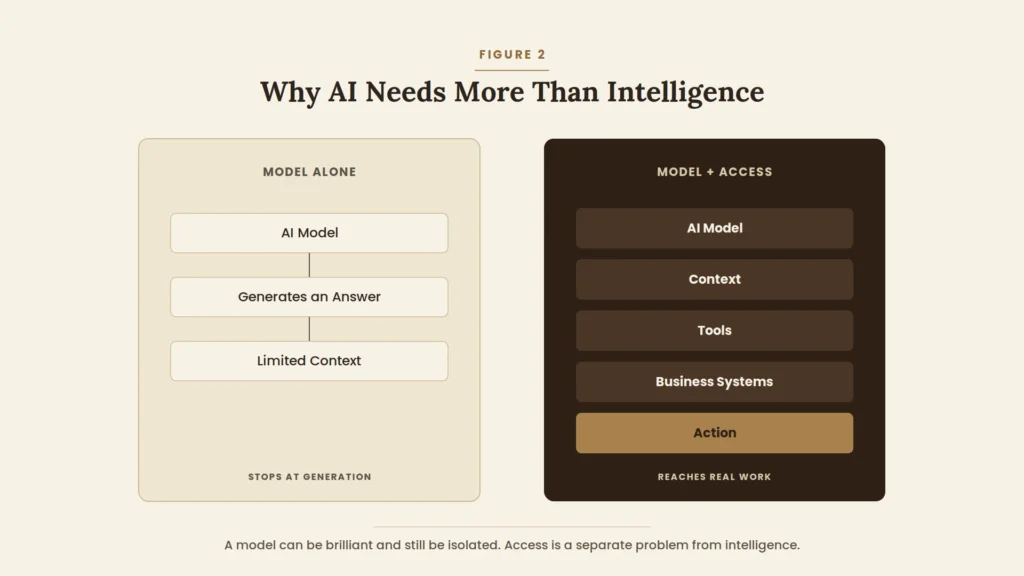
The assistant might be genuinely excellent at reasoning, writing, and summarizing. None of that helps if it can’t see the CRM record, can’t check the support history, can’t query the internal database. Intelligence and access are separate problems, and most conversations about AI capability quietly assume the second one is already solved.
It usually isn’t. Each of those systems has its own API, its own authentication model, its own data format. Connecting an AI tool to all of them means building and maintaining a separate integration for each pairing and that cost multiplies with every new AI tool a company adopts and every new system it wants that tool to reach. A company running three AI tools against seven internal systems isn’t looking at ten connections. It’s potentially looking at twenty-one, each with its own quirks, its own failure modes, and its own maintenance burden.
That’s the specific problem MCP addresses. Not “AI isn’t smart enough,” but “even smart AI can’t reach the information and tools it would need to actually help.”
What Is MCP, Really?
Anthropic introduced the Model Context Protocol in November 2024, describing it in its original announcement as an open standard for connecting AI assistants to the systems where data actually lives content repositories, business tools, and development environments in place of a custom, one-off integration for every new data source.
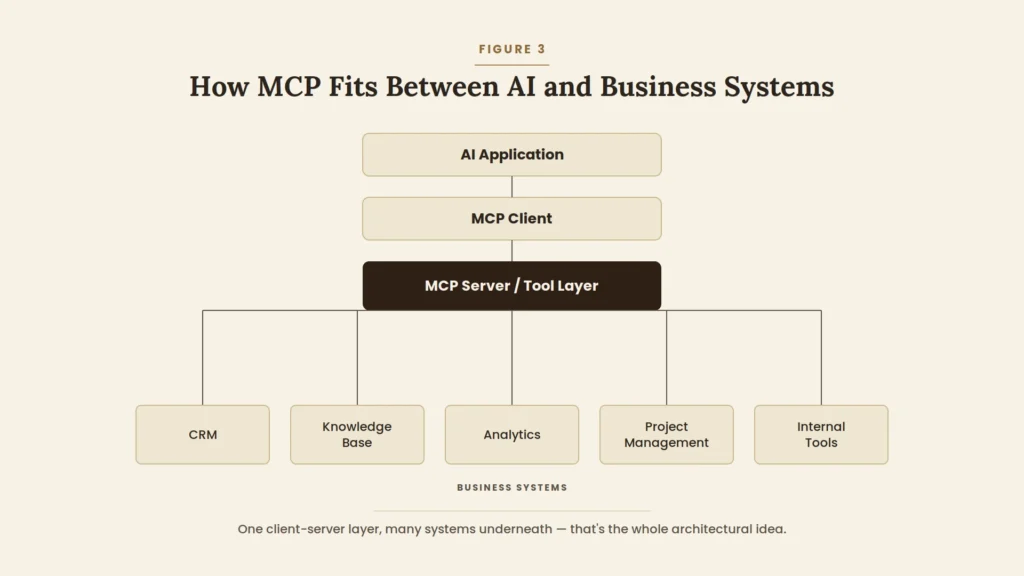
The plainest way to describe it: instead of every AI application building its own private connection to every tool it wants to use, MCP gives both sides a shared language. A business system exposes what it can do through something called an MCP server. An AI application connects to that server through an MCP client. As long as both sides speak the protocol, the AI application can discover what the server offers and use it without a bespoke integration built specifically for that pairing.
Underneath that plain description sits a small, deliberately simple set of building blocks. A host is the AI application itself a chat interface, an agent platform, a coding assistant. Clients are the connections that host maintains with each server it talks to. Servers expose three kinds of things: tools the AI can invoke to take an action, resources it can read for context, and prompts reusable instruction templates a server can offer. None of this needs to be visible to a business user. What matters is the outcome: a company can expose a system once, through one server, and have it usable by any MCP-compatible AI application, rather than rebuilding the connection for each one.
Why Traditional Integrations Don’t Scale Easily
The pre-MCP default looked like this: AI Tool A gets a custom integration into the CRM, and a separate custom integration into the internal database. AI Tool B, adopted six months later, needs its own custom integration into the same CRM, and its own separate integration into the same database because Tool B’s integration code doesn’t reuse anything Tool A’s team built.
Each new tool added to the stack multiplies the number of connections that need to be built and, more importantly, maintained. And maintenance is where this quietly becomes expensive: when the CRM’s API changes, every custom integration built against it needs to be checked and often updated, not just one shared connection point.
The consequences compound in familiar ways. Engineering time goes into rebuilding connections that already exist elsewhere in the company, under a different tool’s name. Access patterns become inconsistent one AI tool might have broader permissions into a system than another, with no one fully tracking why. Security review has to happen separately for each integration, because each one was built differently. And experimentation slows down, because trying a new AI tool means committing to a new round of integration work before anyone knows whether the tool is actually useful.
MCP doesn’t make all of that disappear. It offers a more standardized shape for the connections themselves, so that a system exposed once, through one server, doesn’t need to be re-exposed from scratch for every new AI application that wants to use it.
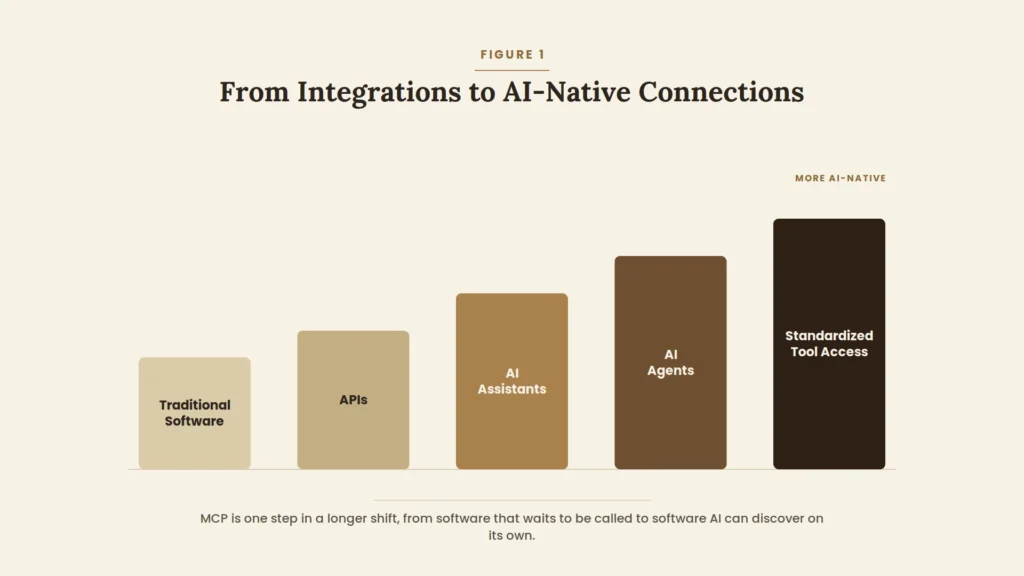
MCP vs Traditional APIs and Integrations
It’s worth being precise here, because this is the point where MCP gets oversold most often: MCP does not replace APIs. Most MCP servers are themselves built on top of a system’s existing API MCP standardizes how an AI application discovers and calls that API, not what the API does underneath.
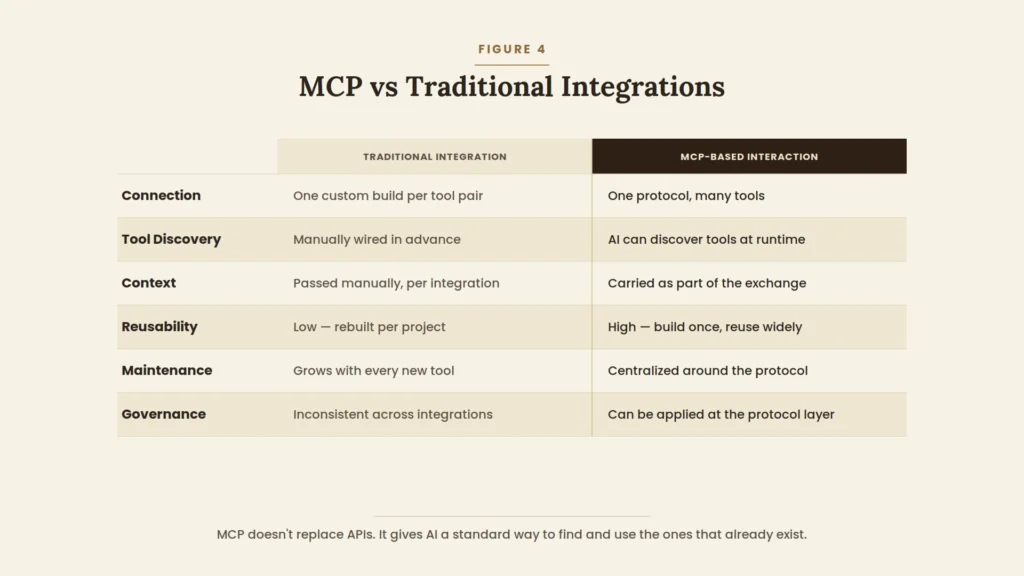
The practical difference shows up in a handful of places. A traditional integration is built for one specific pairing of tool and system; an MCP server, once built, is available to any MCP-compatible AI application that connects to it. A traditional integration typically has to be wired up in advance, with the AI application’s developers deciding ahead of time exactly what it can call; MCP allows an AI application to discover what a server offers at the point of use. Context that would otherwise have to be manually threaded through a custom integration becomes part of the standard exchange between client and server. And because the connection pattern is consistent across tools, governance and monitoring can be applied at the protocol level instead of being reinvented for each integration.
None of this means governance becomes automatic, or that a company can skip security review because a connection happens to be MCP-based. It means the starting point is more consistent which is a real advantage, but a modest one, not a transformation of the underlying access-control problem.
Why MCP Matters for AI Agents
The case for MCP gets substantially stronger once the AI system in question isn’t just answering questions, but acting as an agent something that plans a sequence of steps, uses tools, and takes actions rather than producing a single response.
An agent that can only generate text is limited to whatever the person prompting it already knows and is willing to type in. An agent that can retrieve information, reason over it, call the appropriate business tool, and take an action is doing something categorically more useful but only if it has a reliable, consistent way to discover and use those tools in the first place.
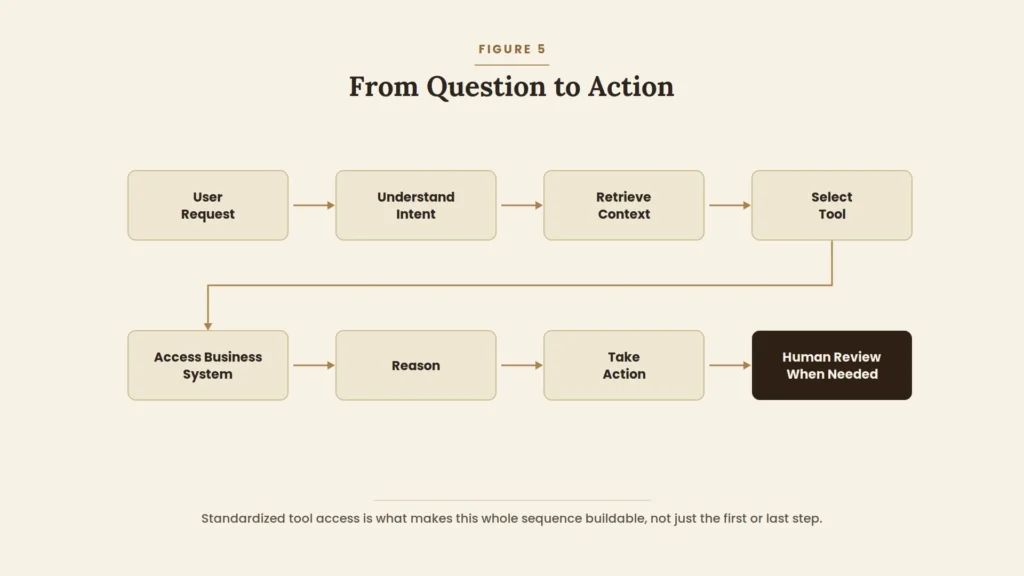
Consider a customer question that requires checking account history, cross-referencing a knowledge base article, and looking up a related open ticket before a useful answer is even possible. Without a standardized way to reach those three systems, an engineering team has to hand-build the connective tissue for that specific workflow. With it, the same underlying pattern discover the right tool, call it, use what comes back applies whether the agent is checking a CRM, a knowledge base, or an internal database, because the discovery and invocation mechanism is the same regardless of which system sits behind it.
That consistency is what makes agent workflows meaningfully easier to design and extend. Adding a new system for an agent to use becomes a matter of connecting one more MCP server, rather than redesigning how the agent calls out to the world every time its toolset changes.
What MCP Could Change for Business Teams
The following are realistic possibilities, not a list of what every company already has running today. Some of these use cases exist in early form now; others are directionally sensible next steps that depend on a specific business connecting the right systems.
Marketing. An AI workflow that can pull campaign performance data, cross-reference it against CRM records, and check what’s already been published in the content system rather than working from screenshots and manual exports.
Sales. An assistant that can look up account history, recent meeting notes, and sales intelligence in one motion before a call, instead of a rep manually assembling the same information from three tabs.
Customer support. An agent that checks a customer’s history, searches the knowledge base, and looks at ticketing status together, so a response reflects the full picture rather than whatever fits in one system’s view.
Operations. A workflow that can reach project management data, internal documents, and reporting tools together, useful for status rollups and cross-team visibility that currently require manually stitching several tools together.
Product. An assistant that can connect product usage data, customer feedback, and an issue tracker, surfacing patterns across sources that are each individually well-instrumented but rarely looked at side by side.
What’s currently available varies a great deal by vendor and by system. Some popular business tools have official MCP servers already; others don’t yet, and a business wanting to connect them would need custom work the same custom work MCP was designed to reduce over time, not eliminate immediately.
MCP Is Not a Magic Layer
This is the section a genuinely useful explanation of MCP can’t skip. Standardizing how AI reaches a company’s systems is not the same as making that access automatically safe, correctly scoped, or well governed.
Security and permissions remain the business’s responsibility. An MCP server that exposes more than it should, or that a company connects without reviewing what it can actually do, creates real risk the protocol makes connection easier, which means access-control decisions matter more, not less. Authentication needs to be handled properly for every server a company connects, particularly for anything reaching sensitive data. Data access boundaries have to be deliberately set; “the AI can now technically reach this system” is not the same question as “should the AI be able to reach this system, and under what constraints.”
Governance doesn’t happen automatically just because a connection is protocol-based. A company still needs to decide who can add new MCP servers, what gets logged, and how access is reviewed over time. AI systems can still make mistakes or use a tool incorrectly even when the tool itself is reachable and well-described standardized access doesn’t prevent an agent from calling the right tool with the wrong parameters, or misinterpreting what a result means. Monitoring what an AI system actually does with the access it has been given matters as much as granting the access in the first place. And the ecosystem itself is still maturing: server quality varies, some official integrations are more complete than others, and implementation complexity is real, particularly for systems that don’t yet have a ready-made server available.
None of this is an argument against using MCP. It’s an argument against treating protocol adoption as a substitute for the security and governance work that any system touching business data still requires.
The New AI Architecture
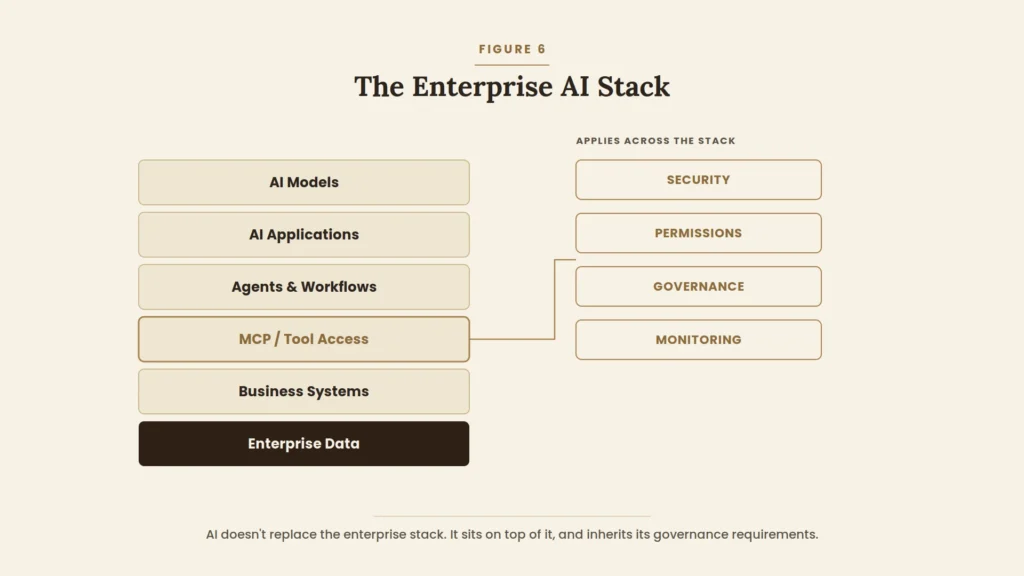
Zoomed out, the shift MCP represents is architectural. Models sit at the base, providing reasoning. AI applications sit above that, providing an interface. Historically, the next layer up was mostly generated text the application’s output was the end of the chain. MCP inserts a layer between the application and the business itself: a standardized tool-access layer that connects the application to business systems, which in turn hold the data and expose the actions an agent might actually need to take.
The practical consequence of that extra layer is that AI stops being purely a text-generation step at the end of a workflow and starts being able to sit inside the workflow checking a system, taking an action, and continuing, rather than producing a response for a person to go act on manually.
What MCP Means for Marketers and Business Leaders
For a reader who isn’t writing any of the code involved, the honest answer to “why should I care” is narrower than the hype around MCP sometimes suggests, but still real. A more standardized connection layer means AI experimentation can move faster, because connecting a new AI tool to an existing system doesn’t necessarily require starting an integration project from scratch. It means agent workflows that need to touch multiple systems are more feasible to design, because the underlying connection pattern is consistent. It means less fragmented AI tooling over time, as vendors converge on a shared way of exposing what their products can do. And it means AI systems can be given more direct access to a company’s actual context which, done carefully, makes the output genuinely more useful rather than just more confident-sounding.
What leaders should not do is treat MCP support as a purchasing criterion on its own. A vendor advertising MCP compatibility has told you something about how their product connects to other systems not whether the product solves a real problem, whether its security model is sound, or whether it’s reliable enough to trust with production access to business data. Before adopting anything on the strength of MCP support, the more useful questions are the same ones that applied before the term existed: what business problem does this actually solve, what does the security and permissions model look like, what does it integrate with today rather than roadmap, how reliable is it in practice, who owns governance for it, and what measurable value is it expected to produce.
A Practical MCP Readiness Checklist
- Identify repetitive workflows that currently require pulling information from more than one system
- Map exactly which systems those workflows touch, and who owns each one
- Identify what data permissions already exist for each system, and who can change them
- Determine where AI genuinely needs context versus where a simpler summary or report would do
- Determine where AI would need to take an action, not just retrieve information and who signs off on that
- Review security requirements with whoever owns that function before connecting anything to live data
- Evaluate which MCP-compatible tools or servers already exist for the systems involved, versus what would need custom work
- Start with one contained, low-stakes workflow rather than a company-wide rollout
- Define in advance how you’ll measure whether the workflow actually improved something
- Establish who owns ongoing governance access review, monitoring, and updates before scaling beyond the pilot
Where MCP Goes Next
Some directions seem like reasonable extrapolations of where things already stand, though they shouldn’t be read as certainties. More AI-native applications are likely to treat standardized tool access as a default assumption rather than a differentiator. Agent workflows are likely to keep getting richer as more business systems become reachable through a consistent pattern. Enterprise governance tooling built specifically for this kind of access permissioning, auditing, monitoring is likely to mature alongside adoption, following a path similar to how governance tooling matured around cloud infrastructure and API management before it. Multi-system AI assistants that draw on several tools within a single request are likely to become more common as more of the systems they’d need are reachable. And security practices specific to this kind of AI tool access distinct from traditional API security are still being worked out across the industry, not settled.
None of that amounts to a guarantee that MCP specifically remains the standard that wins out long-term, though its adoption by multiple major AI providers and infrastructure companies over the period since its release suggests real momentum rather than a single-vendor experiment.
FAQ
What is MCP in simple terms? An open standard that lets AI applications discover and use business tools and data through a consistent connection pattern, instead of a custom integration for every pairing of AI tool and system.
Is MCP the same as an API? No. An API is how a system exposes its functionality. MCP is a standardized way for AI applications to discover and call that functionality most MCP servers are built on top of a system’s existing API rather than replacing it.
Does MCP replace APIs? No. It sits alongside them, giving AI a common way to find and use APIs that already exist, rather than eliminating the need for them.
Why does MCP matter for AI agents specifically? Agents need to take multi-step actions across systems, not just generate text. A consistent way to discover and call tools makes that kind of workflow far more feasible to build and extend.
Can businesses use MCP without building their own AI model? Yes. Most businesses adopting MCP are connecting existing AI applications to their own systems via MCP servers, not building models from scratch.
Is MCP secure? The protocol itself doesn’t guarantee security that depends on how each server is built, authenticated, and governed. Standardized access makes it easier to apply consistent security practices, but doesn’t apply them automatically.
What systems can MCP connect to? In principle, any system that has or can be given an MCP server content repositories, databases, CRMs, and other business tools. Actual availability depends on whether that specific system already has a server built for it.
Should a business adopt MCP now? For a specific, contained workflow with a clear owner and a real access problem, it’s often worth evaluating. As a company-wide mandate adopted because the term is trending, it isn’t the checklist above is a more useful starting point than the protocol name itself.
Bottom Line
Model capability has been the headline story of AI for the past several years, and it’s still improving quickly. But for a growing share of real business use cases, the more binding constraint isn’t how capable the model is. It’s whether that capability can actually reach the systems, documents, and tools where the relevant work already happens.
MCP doesn’t resolve that constraint on its own, and it doesn’t make the security and governance questions go away. What it offers is a more consistent, more maintainable way to close the distance between AI and the systems businesses already run which, quietly, may end up mattering more than the next model upgrade.
