
Zoho Expense vs Expensify: We Tested Both on 11 Real Receipts

Expensify scored higher on performance. Zoho Expense won on price efficiency. Here is who should pick which.
By HITESH ADVANI – CFA LEVEL 3 CANDIDATE, AI & Beyond Pro
If you are choosing between Zoho Expense and Expensify, the real question is simple: which one reads your receipts correctly, and which one is worth the monthly bill? We tested both side by side on real receipts from our own team, and scored them on what a small business actually cares about. Here is what we found.
One line verdict
| Expensify 80/100 Zoho Expense 73/100Expensify processed receipts faster and categorized expenses far more accurately in our 11 receipt test, earning an overall performance score of 80/100 compared to 73/100 for Zoho Expense. But Zoho’s lower cost and flexible foreign currency management make it the stronger choice for budget conscious teams. |
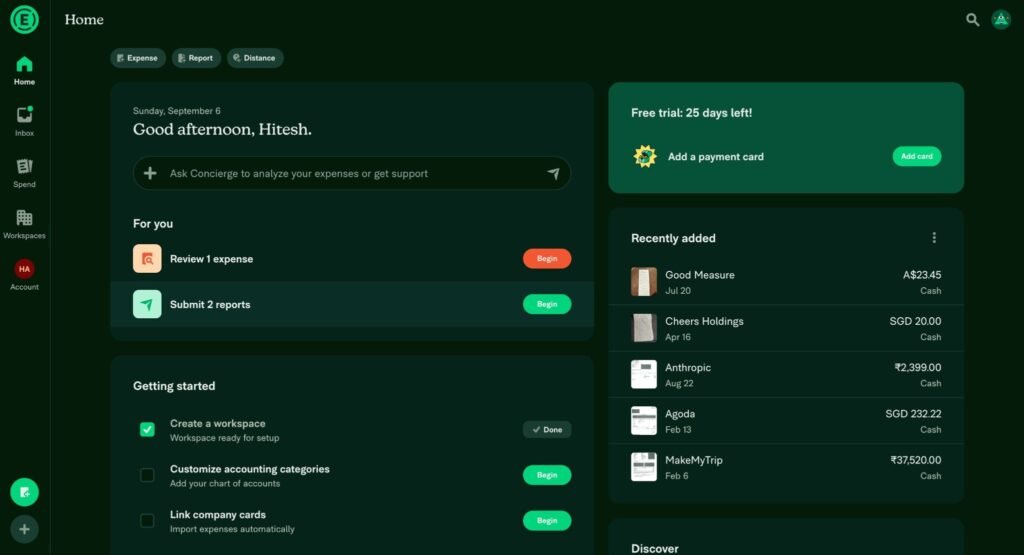
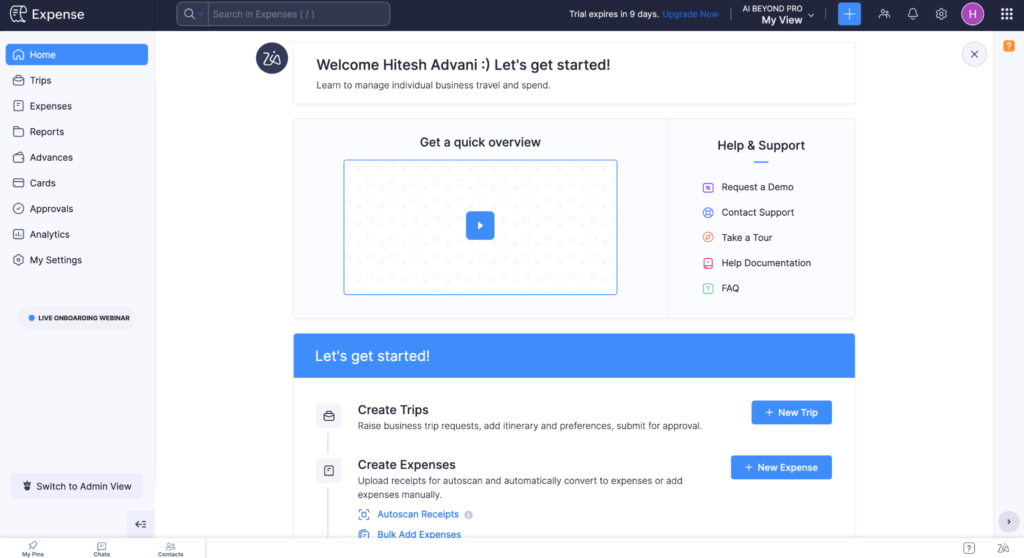
Let’s take a quick look at how the interfaces compare for Expensify & Zoho Expense
Methodology: what we tested
We compared the free versions of both platforms, specifically evaluating Expensify against Zoho Expense. Both platforms were tested live using actual receipts from our team.
Our receipts consisted of 11 receipts in a few currencies. We kept it simple on purpose to understand the tools better.
Digital vs. physical
We included 7 clear digital receipts and also 4 physical paper receipts. Physical, unclear receipts are important. Why? Because employees may often forget to keep the receipt safe, or may be in a hurry to keep their receipts perfectly unfolded and safe. Receipts fold off. So this is particularly important, as employees can’t always keep things intact for many reasons. Hence, we included them in our analysis.
Scoring method
Performance was evaluated across two distinct layers.
OCR Extraction Accuracy: This is the most important layer, optical character recognition, which includes the information extracted from the receipts. Each of the 11 receipts was evaluated across 3 core fields: Merchant Name, Date, and Total Amount. Rated on a scale of 1 to 10.
Platform Performance Ratings: We rated each software on a scale of 1 to 10 across these critical workflow categories: Speed (average processing time), Categorization (automatic account mapping), Itemization (splitting lines and taxes), Ease of Use (workflow friction), and Foreign Transactions (adjusting forex rates).
Weighted Grading: The final performance grades (out of 100) were calculated using a weighted system reflecting actual business priorities:
| Category | Weight |
|---|---|
| OCR accuracy | 30% |
| Ease of use | 20% |
| Itemization | 20% |
| Categorization | 15% |
| Foreign transactions | 10% |
| Speed | 5% |
This is a subjective grading. But we have found OCR accuracy, Ease of Use, and Itemization are likely to be the most important aspects for any team.
Cost Efficiency Ratio: We adjusted the results obtained for the cost pricing of both tools. A higher ratio here indicates you get relatively more efficiency for each dollar spent.
| Limitations. Sample Size: The test set was restricted to 11 receipts; a larger volume is often important to get statistically significant results. Evaluation Scope: Our focus is strictly tailored to small businesses needing simple expense processing. We did not evaluate policy enforcement, custom approval workflows, accounting sync, or mobile app experiences. |
Performance scorecard
| Evaluation category | Weight | Expensify | Zoho Expense |
|---|---|---|---|
| OCR extraction accuracy | 30% | 10 | 9 |
| Ease of use | 20% | 8.5 | 6 |
| Itemization | 20% | 5 | 7 |
| Categorization | 15% | 8 | 4 |
| Foreign transactions | 10% | 6 | 10 |
| Speed | 5% | 10 | 8 |
| Final score | n/a | 8.0 | 7.3 |
| Final scaled score | n/a | 80/100 | 73/100 (approx) |
Key performance findings
OCR Extraction Accuracy (Weight: 30%)
Expensify 10/10 | Zoho Expense 9/10
Both platforms processed digital invoices perfectly. However, for one physical receipt, Zoho misread a critical date field, extracting April 26th instead of the correct April 20th, whereas Expensify maintained 100% date accuracy.
| Also note. Zoho Expense also has a Description and a Reference field. Data extraction for some physical receipts showed some errors on this ground, but given these fields are completely absent from Expensify, we did not consider penalizing Zoho, to keep the evaluation fair. |
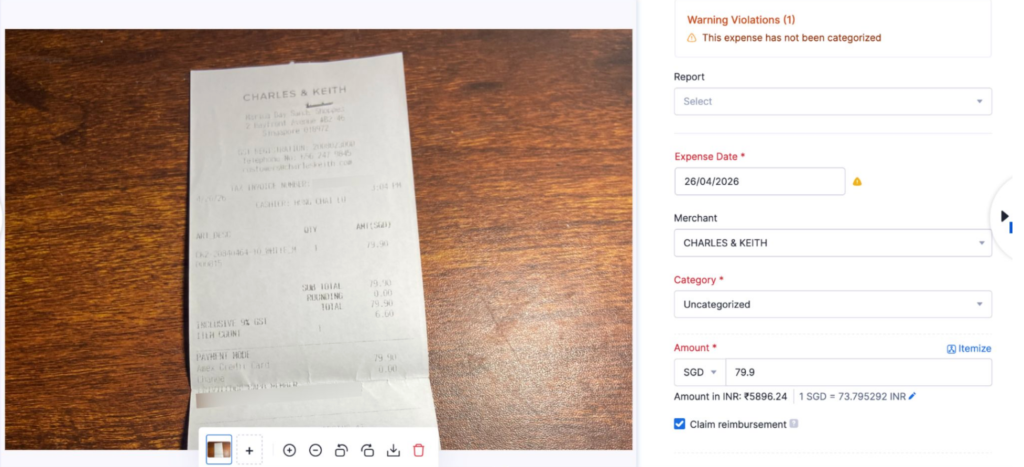
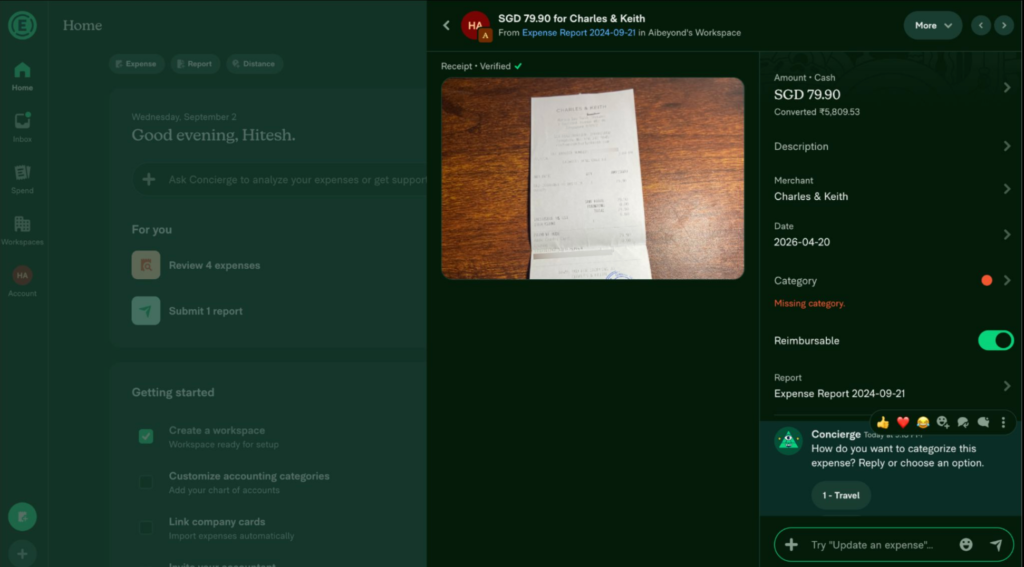
Note: The date format is different for both and would likely depend on your region.
Processing Speed (Weight: 5%)
Expensify 10/10 | Zoho Expense 8/10
Expensify was noticeably faster, averaging 20.4 seconds per receipt (ranging from 14 to 34 seconds). Zoho averaged 30 seconds per receipt with a wider range (16 to 41 seconds). Clearly Zoho took longer on average per receipt. This may not materially make much of a difference unless analyzing many receipts. Hence, we gave it the least weight.
Categorization (Weight: 15%)
Expensify 8/10 | Zoho Expense 4/10
Expensify successfully categorized 78% of eligible transactions (7 of 9 expected receipts) into logical categories like “Travel”. Zoho struggled with a low 25% success rate (1 of 4 receipts), completely leaving out obvious details like flight invoices.
Why were only 4 receipts considered in the denominator for Zoho? Zoho’s default categorization is limited, and hence only 4 receipts were considered. Expensify had a category of “Travel” which can include many expenses like hotels, flights, and cab rides, and also included a category for “Professional Services” which can be helpful.
The receipt below shows the air ticket from Mumbai to Singapore that was left uncategorized by Zoho Expense.
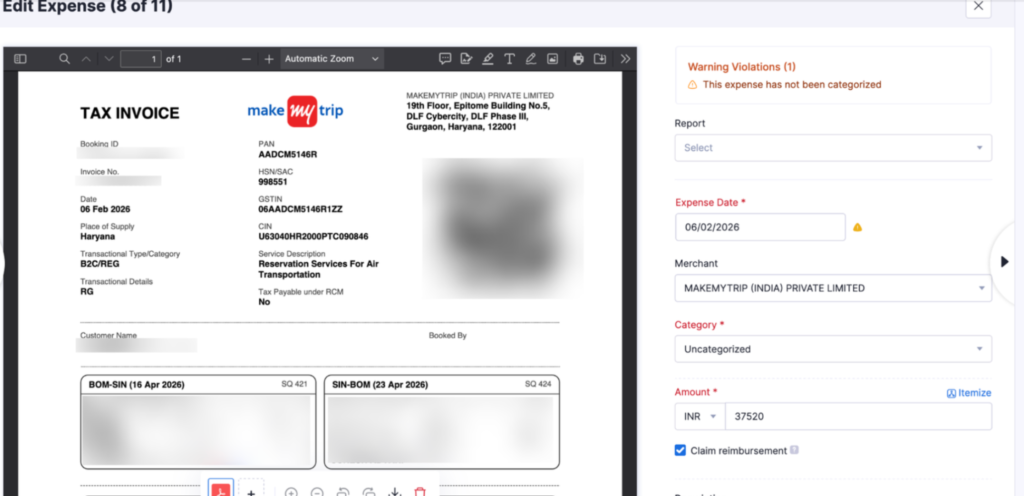
Both platforms list 19 total active categories in their default or custom configuration setups.
| # | Zoho category | Expensify category |
|---|---|---|
| 1 | Air Travel Expense | Advertising |
| 2 | Automobile Expense | Benefits |
| 3 | Construction Loans | Car |
| 4 | Fuel/Mileage Expenses | Equipment |
| 5 | IT and Internet Expenses | Fees |
| 6 | Job Costing | Home Office |
| 7 | Labor | Insurance |
| 8 | Lodging | Interest |
| 9 | Materials | Labor |
| 10 | Meals and Entertainment | Maintenance |
| 11 | Mortgages | Materials |
| 12 | Office Supplies | Meals and Entertainment |
| 13 | Other Expenses | Office Supplies |
| 14 | Parking | Other |
| 15 | Prepaid Expenses | Professional Services |
| 16 | Subcontractor | Rent |
| 17 | TDS Payable | Taxes |
| 18 | TDS Receivable | Travel |
| 19 | Telephone Expense | Utilities |
Itemization (Weight: 20%)
Zoho Expense 7/10 | Expensify 5/10
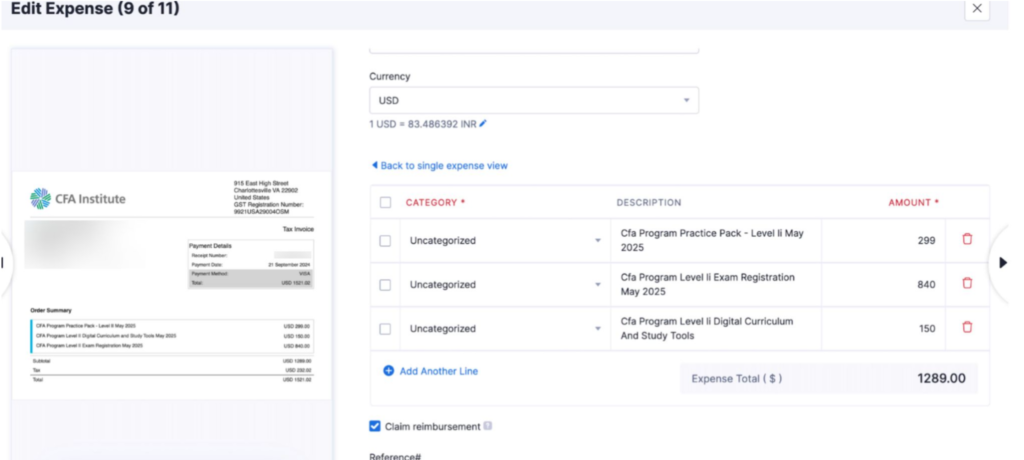
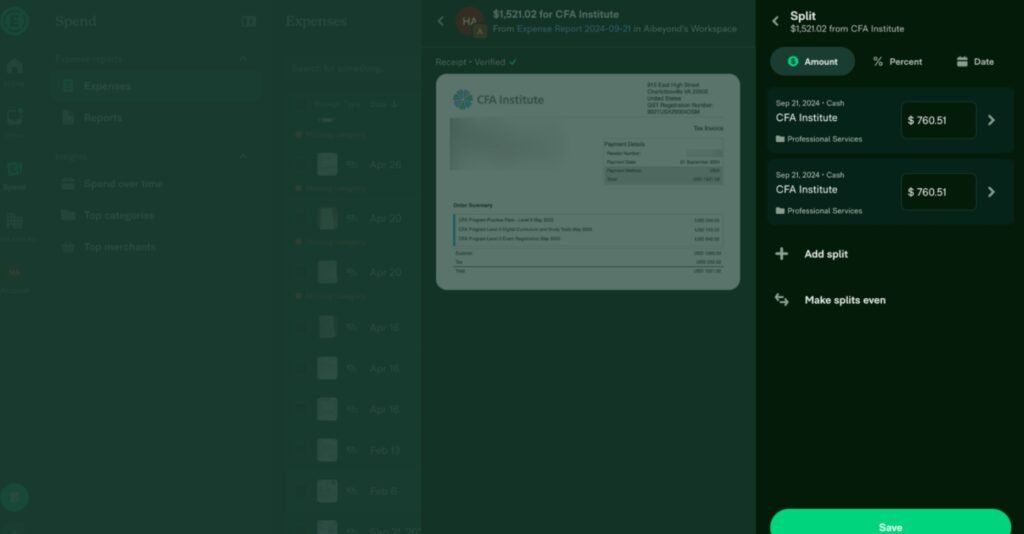
Zoho actively attempts to automate receipt itemization, though it frequently misses tax line breakdowns and requires manual edits. Expensify does not automate splits; users must manually build them using the “Split Expense” tool, which is a bit difficult to navigate compared to Zoho Expense, which has a clearly labelled option.
To those who don’t understand this very well, let’s consider an example to understand the importance. Itemizing involves breaking down the total costs into components.
Let’s say your staff hits a $60 restaurant bill when the upper limit for the expense to be reimbursable is $75 pre tax. After sales taxes and service charges, the bill spikes to $77(which is now greater than 75$ limit) and the expense would be wrongly disqualified.
To avoid this, one prefers itemizing. Alternatively, if you simply want to keep track of taxes paid under each expense for book records, itemizing comes in handy.
Zoho tries to automate itemization, but the itemization is very often inaccurate and often misses out on important things like taxes, requiring manual editing as shown below:
On the other hand, Expensify does not automatically itemize individual line items on a receipt. So one needs to manually itemize individual line items using the “Split Expense” option, and has to appropriately choose the amount, which is split in equal portions by default. However, this could be difficult to navigate and is not as straightforward as Zoho Expense. Itemized items can be broken down as shown below.
Ease of Use (Weight: 20%)
Expensify 8.5/10 | Zoho Expense 6/10
Expensify’s interface seems more user friendly and easier to navigate. Especially from an employee’s perspective, they are likely to find Expensify’s interface easier to navigate at first.
Foreign Currency Transactions (Weight: 10%)
Zoho Expense 10/10 | Expensify 6/10
Zoho lets you choose the most appropriate exchange rate manually, which comes in handy to handle any rate discrepancy or any other additional charges that users face. Expensify doesn’t have a manual option to do this.
In Zoho Expense, let’s say your company is based in New York City, US, and your employee is on a business trip visiting a client in Toronto, and pays in CAD using their card. They can edit the appropriate exchange rate on that day for any forex markup and any other fees, to reflect the net effective exchange rate for them.
The image shows below how exchange rate can be manually edited in Zoho.
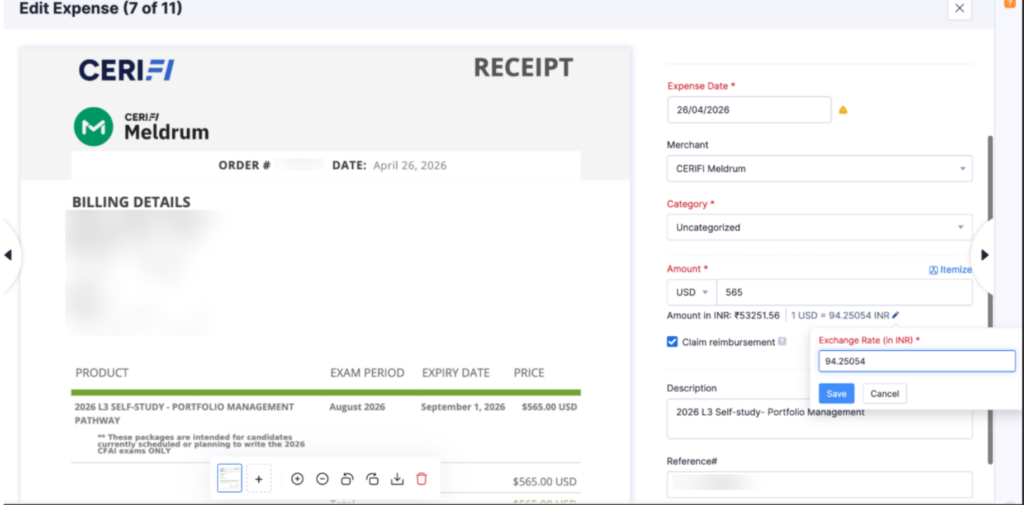
For instance, the USD/CAD rate chosen by the system was 1.4 CAD/USD. This can be changed to 1.35 or 1.45, or anything else that is more representative.
Expensify is more strict about this, and hence this can make the process cumbersome for employees.
Pricing
We have tested on free tiers. However, for the pricing below, we have compared the entry paid plans that a small business would actually buy.
Zoho’s plans are relatively easier to understand, whereas Expensify has many complex features and various other nuances with respect to its pricing policy. However, for simplicity we have considered the most simple paid plans in our comparison, which may be appropriate for smaller businesses.
Cost comparison: Expensify Collect vs. Zoho Expense Standard
A comparison of the standard, non-discounted pricing for US-based customers in USD shows that Zoho Expense Standard is cheaper on both a monthly and annualized basis.
| Billing frequency | Expensify Collect | Zoho Expense Standard |
|---|---|---|
| Monthly (pay month to month) | $5.00 per unique user/month | $4.00 per active user/month |
| Annualized (paid monthly) | $60.00 per unique user/year | $48.00 per active user/year ($4 x 12) |
| Annualized (paid annually) | $60.00 per unique user/year (option not available, but this will be your cost) | $36.00 per active user/year |
On a monthly basis, one saves 20% using Zoho Expense Standard over Expensify Collect. However, on an annualized basis, one saves 40% using Zoho Expense Standard over Expensify Collect.
Monthly cost by team size (monthly paid plan)
For a team of 5, 10, 20, or 50 people, here is how much you would be paying monthly under the monthly paid plan:
| Team size | Expensify Collect (per month) | Zoho Expense Standard (per month) |
|---|---|---|
| 5 users | $25.00 | $20.00 |
| 10 users | $50.00 | $40.00 |
| 20 users | $100.00 | $80.00 |
| 50 users | $250.00 | $200.00 |
Annual cost by team size (annually paid plan)
For a team of 5, 10, 20, or 50 people, here is how much you would be paying under the annually paid plan:
| Team size | Expensify Collect (annualized, bought monthly) | Zoho Expense Standard (bought annually) |
|---|---|---|
| 5 users | $300.00 | $180.00 |
| 10 users | $600.00 | $360.00 |
| 20 users | $1,200.00 | $720.00 |
| 50 users | $3,000.00 | $1,800.00 |
If your team wants to switch to annual plans ultimately, one can save 40% using Zoho Expense as shown above.
So what’s the best option for you?
If you are price insensitive, you are likely to find Expensify better, as it scored 80/100 on a scaled basis, whereas Zoho scored 73/100.
However, we have also calculated a cost efficiency ratio for price sensitive users. A higher ratio means you get more efficiency for every dollar spent. This depends on the chosen plan and is illustrated below.
| Platform & plan | Comparative cost | Performance score | Efficiency ratio |
|---|---|---|---|
| Expensify (Base) | $100 | 80 | 0.80 |
| Zoho Expense (Monthly / 20% off) | $80 | 73 | 0.91 |
| Zoho Expense (40% off) | $60 | 73 | 1.22 |
On both measures, Zoho Expense has a better efficiency ratio compared to Expensify.
Frequently asked questions
Is Expensify or Zoho Expense better?
On performance, Expensify scored 80/100 versus 73/100 for Zoho Expense, winning on OCR accuracy, categorization, ease of use, and speed. Zoho wins on itemization, foreign currency, and price, which makes it the stronger pick for budget conscious teams.
Which is cheaper, Zoho Expense or Expensify?
Zoho Expense. Its Standard plan is $4 per active user/month versus $5 per unique user/month for Expensify Collect. That is 20% cheaper monthly, and can be 40% cheaper annually when paid annually.
Does Expensify or Zoho have better receipt OCR?
Both read digital receipts well. Expensify edged ahead 10 to 9 because Zoho misread a date on one physical receipt, extracting April 26th instead of April 20th, while Expensify kept 100% date accuracy.
Can Zoho Expense handle foreign currency better than Expensify?
Yes. Zoho lets you manually edit the exchange rate on each transaction to reflect forex markups and fees. Expensify does not have a simple option to do this, so Zoho scored 10/10 because of the convenience whereas Expensify got 6/10 due to the complications involved around this.
Which expense tool is best for a small business?
Budget conscious teams and anyone handling multi currency spend should choose Zoho Expense for its lower cost and manual forex control. Teams that value speed, automatic categorization, and an easier interface, and are less price sensitive, should prefer Expensify.
